The Self-Hosted Cloud Built for Freelancers and Professionals
A self-hosted cloud built for freelancers and professionals. Use it on your PC or choose our managed service. Full control, privacy and cost-efficiency.
- 01Your own workspace, not a pile of paid platforms.
- 02SaaS bills grow, and you don’t control your data.
- 03One place with 200+ apps instead of many plans.
- 04No per-user pricing, with backups and SSL included.
- 05Share files with clients, code, design, budget and more.
- 06Made for freelancers, no tech background needed.
Your Own Digital Workspace as a Freelancer
- Freelancers juggle tools, client data and costs.
- Paid platforms get expensive and tie you down.
- HomeDock OS gives you your own workspace.
 Nextcloud
 Kimai
Kimai FacturaScripts
 BudgE
BudgE ProjectSend
 WordPressWordPress
unique small businesses
Museum of Modern Art
Your portfolio, on your own cloudFreelancing gives you freedom, but it also comes with its own set of challenges: managing tools, protecting client data, and keeping costs in check. More and more independent professionals are discovering the benefits of a self-hosted cloud for freelancers. It’s a way to stay in control without being tied to overpriced platforms. HomeDock OS makes that shift easy, giving you your own digital workspace that works just how you need it.
Self-Hosted Cloud Solutions for freelancers
- SaaS charges per user, per feature and per gigabyte.
- Hidden fees add up without you noticing.
- Your own cloud tells you where client data lives.
- File sharing · 2 seats€24.00
- Time tracking · Pro€12.00
- Invoicing · Plus€19.00
- Portfolio site · Business€25.00
- Office suite · 2 seats€20.00
- Extra storage · 1 TB€9.99
- Egress over quota€14.20
- Compute charges€8.60
As a freelancer, you've probably dealt with your fair share of Software-as-a-Service (SaaS) tools. They’re convenient, yes, but costs can spiral quickly when you're charged for each user, feature, or every gigabyte transferred. Things like egress fees and compute charges often go unnoticed until they add up. And in many cases, you still don’t fully control your own data. That’s where HomeDock OS takes a different path.
That’s why the push for data control for freelancers keeps growing. If you're handling confidential client material, knowing where your data lives and who can access it becomes essential. A private cloud for freelancers offers exactly that, helping you work with more confidence and control.
Introducing HomeDock OS: Your Private Infrastructure at SaaS Prices
- Turn almost any computer into your own cloud.
- 200+ apps in the App Store, a few clicks each.
- No need to be an expert or spend a fortune.
NextcloudSelf-hosted · 1 clickClient file sharingProjectSendSelf-hosted · 1 clickBig deliveries to clientsKimaiSelf-hosted · 1 clickTime trackingFacturaScriptsSelf-hosted · 1 clickInvoices and quotesWordPressSelf-hosted · 1 clickPortfolio website VaultwardenSelf-hosted · 1 clickClient passwords
You shouldn't need to be an expert or spend hundreds a month just to have your own cloud. HomeDock OS changes that. It works like the brain of your digital setup, turning almost any computer into a fully functional cloud, whether for personal projects or your freelance business.
This makes it a strong SaaS alternative for freelancers. Instead of juggling multiple tools and subscriptions, HomeDock OS brings everything together in one place. Through its integrated App Store, you get access to over 200 ready-to-use applications, covering everything from productivity to development, all in a few clicks.
Key Benefits of HomeDock OS for Independent Professionals
- Everything in one place, on your hardware or ours.
- SSL, backups and Shield Mode built in.
- No per-user pricing and no hidden upgrades.
Every freelancer works differently, but most face the same pressure... Using modern tools without getting buried in costs, subscriptions, or complexity. That’s where HomeDock OS starts to shine.
Why HomeDock OS Works for Freelancers
As a freelancer, you need tools that are simple, secure, and cost-effective. With HomeDock OS, easy self-hosting for professionals becomes a real option, with full data control for freelancers and a clear path to reducing SaaS subscription costs, without extra layers of complexity.
- Manage everything from one place using your own infrastructure or our managed cloud.
- Protect your data with built-in SSL, automated backups, and Shield Mode protection.
- Stay GDPR-friendly without relying on third-party platforms.
- Install apps in one click with no command-line required.
- Use everything from day one, with no per-user pricing or hidden upgrades.
- Reuse your current hardware or get started easily in the cloud.
Powering Your Freelance Workflow: Key Use Cases with HomeDock OS
- Share files with clients, safely and with your brand.
- Code, design, audio and office work in your cloud.
- Keep your budget and taxes in check, privately.
- v3Today, 10:42Current
- v22 days ago
- v1Last week
Share linkFrom Nextcloud, on your HomeDock OScloud.yourstudio.com/s/k7Qx2Knowing the theory is one thing, but what can a self-hosted cloud for freelancers really do for you day to day? Let’s look at some real examples that show how HomeDock OS fits into your workflow.
Secure Collaboration and File Sharing with Nextcloud for Freelancers
Need a clean, professional way to share files with clients, manage versions, or send large folders without relying on third-party clouds? Nextcloud gives you full control while keeping everything private. It's a one click install, then you can tailor it to your brand and workflow.
- Customizable portal with your logo and colors.
- Password-protected sharing and expiration dates for extra privacy.
- Automatic version control to avoid overwriting or losing work.
- A cost-effective private cloud that replaces Dropbox or Google Drive.

Start uploading your files on your cloud with Nextcloud
Install Nextcloud to sync files, calendars and contacts. Your private cloud with full control, privacy and collaboration tools.
Get Nextcloud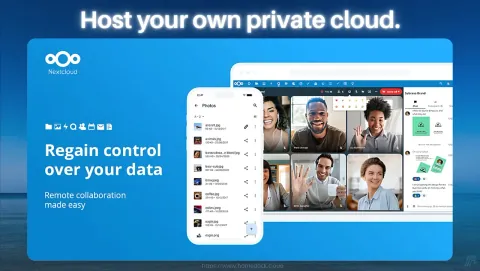
Cloud-Based Development with Open VS Code Server
Working on client projects from different devices or locations? You don’t need to carry your entire dev setup with you. With Open VS Code Server, your full development environment lives in your private cloud, accessible from any browser, and as mentioned above, installation is as simple as one click from our App Store. In fact, HomeDock OS was born exactly this way.
- Access your code securely from anywhere.
- Run, edit, and test projects in the cloud.
- Keep your toolchain consistent across devices.

Code remotely in HomeDock OS with Open VSCode Server
Run full VS Code in your browser. Instant dev access, no local install required, fully self-hosted and private.
Visual Design and Animation with Blender
For creative professionals working in animation, 3D modeling, or design, Blender offers a professional-grade toolset without the licensing headaches. From product visuals to content creation, it’s all yours to host and run locally.
- Full 3D suite for modeling, rendering, and animation.
- Ideal for freelancers doing design, game assets, or motion graphics.
- Open-source and private, with no hidden costs.


Bring your 3D ideas to life with Blender
Design, animate, and render from your own cloud with Blender. Full creative freedom, zero license fees, without limits.
Get Blender
Budget Management for Freelancers with BudgE
Staying profitable means staying organized. BudgE helps freelancers manage their income and expenses with a smart, envelope-style budgeting system that runs entirely on your private cloud.
- Track every expense with full transparency.
- Plan ahead for taxes, savings, and irregular income.
- No third-party finance tools needed. Your data stays yours.

Take control of your freelance finances with BudgE
Stay on top of your freelance income. BudgE helps you budget with clarity and full privacy, no third-party apps involved.
Audio Editing for Creators with Audacity
For podcasters, musicians, or any freelancer working with audio, Audacity gives you full control to record and edit sound professionally, without relying on third-party tools or subscriptions. Run it in your own private cloud and keep every sound file secure.
- Multi-track editing and pro-level effects for audio production.
- Ideal for podcasts, music, or voiceovers.
- Your recordings stay private, stored on your own server.


Edit audio like a pro with Audacity on the cloud
Record and edit high-quality audio from your private cloud. Perfect for podcasts, music, or voice-based freelancers.
Get Audacity
Private Office Suite with Calligra Suite
If your work involves documents, spreadsheets, or slides, Calligra Suite gives you the tools you need without relying on Big Tech. It’s the open-source alternative to Microsoft Office and Google Docs, and it runs entirely in your own cloud.
- Includes docs, sheets, and presentations.
- Perfect for consultants, writers, and remote professionals.
- Full privacy and control, no online accounts or trackers.


Run your own private office suite with Calligra
Create and manage documents, spreadsheets, and slides with full privacy. Your office tools, your rules.
Whether you need a PDF editor, an office suite, a secure messenger or a file transfer server, you can build the exact workflow you want, all from your private cloud running on your own computer. With nearly 200 apps available in the HomeDock OS App Store, there's always something new to discover. Explore, install, and shape your stack around how you actually work.
 FirefoxFast, private web browser for all devices.Get
 JDownloader 2Simplify and automate your download tasks.Get
- Open VSCodeCloud-based code editor for developers.Get
- FacturaScriptsPowerful invoicing and accounting software.Get
 ChromiumBrowser powering modern web applications.Get
 FileZillaRobust FTP client for file transfers.Get
 Disavow GeneratorThe fastest way to generate Google Disavow files.Get
 PlanchetteAI-powered spirit board for interactive conversations.Get
 OperaFeature-rich web browser with VPN support.Get
 SonarrAutomate TV show downloads with torrent.Get
 NGINXHigh-performance web server and reverse proxy.Get
 CodeServerRun Visual Studio Code on your server.Get
 GravFlat-file CMS for lightweight websites.Get
- ProjectSendShare and manage files securely with clients.Get
 WebCordElectron-based Discord client for desktop users.Get
 GrocySelf-hosted groceries and household management.Get
 MeTubeDownload videos and manage local media.Get
 NavidromeStream your music library from anywhere.Get
- AudacityEdit and record audio with professional tools.Get
 GhostInkWrite invisible secret messages inside emojis.Get
 GitHub DesktopVersion control with GitHub's desktop client.Get
 KavitaSelf-hosted reading server for comics and books.Get
 The AtlasA whole universe simulation, on your pocket.Get
 VSCodiumFree, open-source Visual Studio Code alternative.Get
 Minecraft ServerHost your own Minecraft worlds for multiplayer fun.Get
 LycheePhoto management with sleek interface.Get
 EmbyPersonal media server for streaming content.Get
 darktablePhoto and image editor for professionals.Get
 AltusWhatsApp client with multiple account support.Get
 ownCloudFile storage and synchronization solution.Get
 WireGuard VPNFast, secure, and modern VPN protocol solution.Get
Getting Started with HomeDock OS for Freelancers: Is It Right for You?
- For freelancers, consultants, designers and writers.
- Your clients’ data stays confidential.
- Fewer costs, fewer dependencies, easy to start.
- You keep client files you’d rather not hand to a third party
- You pay for more subscriptions than you’d like
- You’d rather click a button than type commands
- You want your tools and data to really be yours
If you're a freelancer, consultant, developer, designer, writer, or any independent professional who values control, privacy, and cost-efficiency, HomeDock OS was made with you in mind. It’s a platform built for easy self-hosting for professionals, with a simple setup and an interface that doesn’t require a tech background.
The shift toward greater data control for freelancers is growing fast. Clients expect confidentiality, and professionals need real ownership of their tools and data. HomeDock OS gives you that control, without locking you into complex systems or unpredictable costs.
Choosing a self-hosted cloud for freelancers isn’t just a technical decision, it’s a smarter way to work. You reduce dependencies, cut unnecessary expenses, and create a more resilient digital presence.
Reclaim your desktop. Turn it into your private cloud.